How to export WhatsApp chats from an iPhone to a PC
Every conversation, with its photos, videos and voice notes, as a web page, a PDF and plain text. Over the cable, nothing uploaded.
Last updated 25 October 2026. Written by BlackBox Tools, the maker of PhoneFerry.
The short answer
Plug the iPhone in, press Read from iPhone in PhoneFerry, wait for WhatsApp's data to arrive (usually within the hour), open a chat in the WhatsApp view and press Export. Each chat becomes a folder with conversation.html, conversation.pdf, conversation.txt and the media. WhatsApp's own Export Chat caps a chat at 10,000 messages and goes through email; this does not.
Step by step
- Install PhoneFerry and plug the iPhone in. Download PhoneFerry from blackboxtools.com, install it, connect the cable and tap Trust on the phone. An iPhone needs Apple's USB driver, which comes with the free Apple Devices app or iTunes.
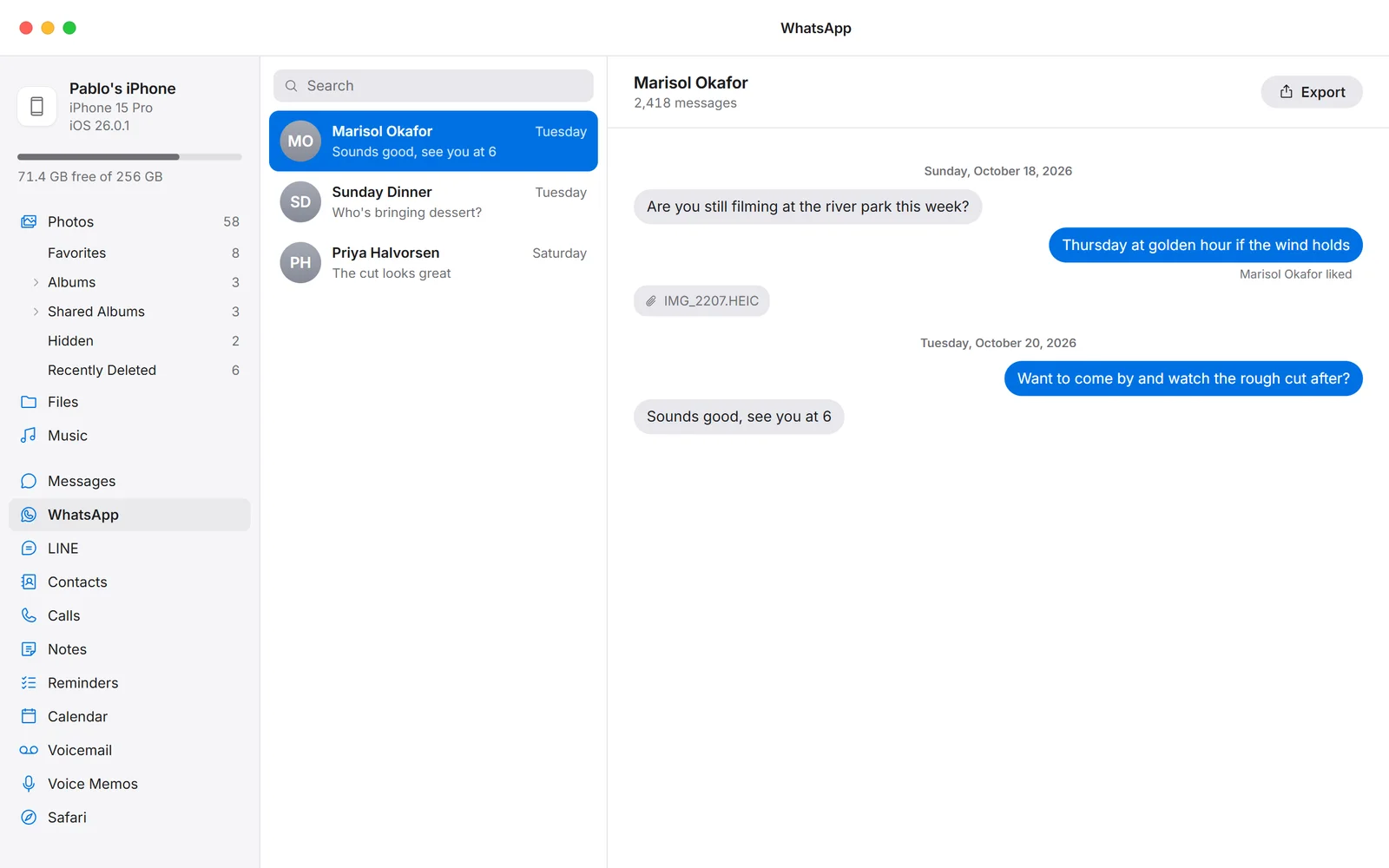
- Read the library once. Click WhatsApp in the sidebar and press Read from iPhone. The phone freezes a snapshot (about three minutes) and then streams its data over the cable. WhatsApp's database and media are among the first things to arrive, usually within the hour; the read carries on for the rest of the library and can be left running.
- Open the chat. Chats list newest first with the last message under each name. Click one to read it with the pictures and voice notes in place. Use Select to tick several.
- Export. Press Export and choose a folder. The chat becomes its own folder with a web page, a PDF printed from it, a plain text file and an attachments folder holding every photo, video and voice note at full size.
Questions
Does it work for WhatsApp on Android?
Not for the messages: WhatsApp on Android encrypts its database with a key only the app holds, so no PC program reads it. PhoneFerry saves WhatsApp's own encrypted archive files to the PC instead, which WhatsApp can load on another phone, and opens the WhatsApp media folder, where the photos, videos and voice notes are plain files.
Is there a 10,000-message limit?
No. WhatsApp's built-in Export Chat stops at 10,000 messages and sends through email. PhoneFerry reads the whole chat from the phone's database; a chat of 20,000 messages exports as one page.
Are group chats included?
Yes, with each sender named. Media sent in the group comes with it.
Is anything uploaded?
No. WhatsApp's data is read from the phone on your own PC over the cable. PhoneFerry has no account and no server.
What does it cost?
Each exported chat is one trial item; the first 100 are free with no time limit. Then $14.99 once, for two PCs, for life.